Midarion Casino – How to Register, Log In and Verify Your Account
If you want to jump into slots, live tables or sports at Midarion Casino, you’ll first need a quick account set‑up, a deposit, and a short verification. Our whole flow is built to be simple, fast and mobile-friendly so you can focus on playing, not paperwork.
How to Sign Up at Midarion Casino: 3-Step Registration
You can open your Midarion account in just a couple of minutes, and you can do it on desktop or mobile with the same form. Before you start, make sure you’ve got access to your email and your phone so you can verify them if needed later.
Step 1 – Choose Your Welcome Offer: Casino or Sports Bonus
First, you’ll land on the welcome screen where you pick what kind of action you’re into more right now, casino or sports. Midarion shows a dedicated casino welcome package with up to €3,000 plus 350 free spins and 1 Bonus Crab, and a separate sports welcome bonus with up to 100% extra on your first sports bet, so you can start where you feel most at home.
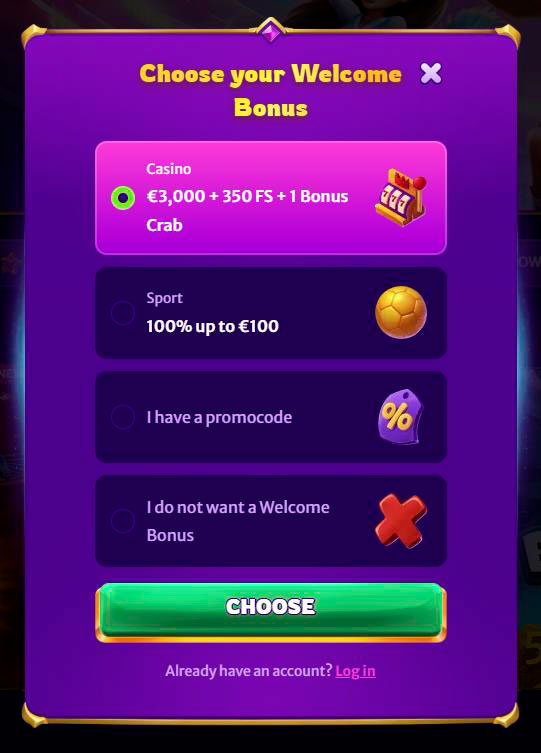
Here’s how that first step looks in practice:
| Choice | What you do | What you get previewed |
| Casino bonus | Select the casino welcome package tile | Up to €3,000 + 350 FS + 1 Bonus Crab |
| Sports bonus | Switch to the sports banner/bonus option | Sports welcome bonus up to 100% |
| Promo code | Enter code in the promo field (optional) | Custom bonus if your code is valid |
| No bonus | Click “No bonus” and continue | Pure cash play, no wagering attached |
Bottom line, you choose your lane right away so we can tailor promos and suggestions to how you like to play.
Step 2 – Enter Your Email and Create a Password
Next up, you get the main registration form where you set up your Midarion login details. You’ll need to enter a valid email address and create a password, tick that you’re at least 18, accept the Terms & Conditions and Privacy Notice, and optionally agree to receive promos and news if you like extra value.
When that’s done, you hit “Next step” and move on, or use the “Log in” link if you actually already registered before. The Midarion login and register buttons also sit permanently in the top header of the site, so you can always reach them from any page.
Step 3 – Complete Your Personal Details
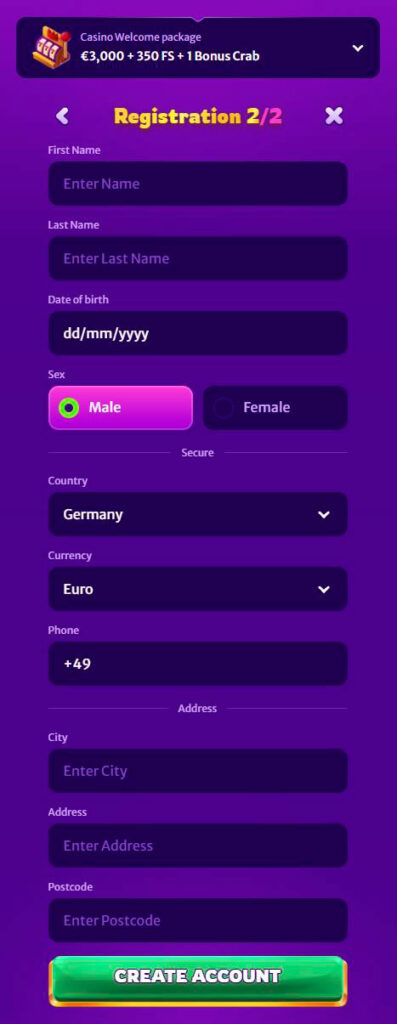
Now you fill in your profile so your account is compliant and ready for real money play. The form asks for your first name, last name, date of birth, gender, country, address (city, street, postcode), phone number and the currency you want to use, with the euro as the default option.
Once you’ve completed all mandatory fields, you simply click “Create account”, and you’re good to go. The details must be accurate and match your documents, since our Terms clearly say your account has to be in your real name and kept up to date.
Now, do you already know whether you’ll be picking the casino welcome package or the sports bonus as your first choice?
Making Your First Deposit After Registration
Now that you’re in, you can head straight to the cashier to make your first deposit and actually trigger your chosen welcome offer. Midarion supports a mix of cards, bank options and several popular methods depending on your country, all with 0% deposit fees on our side and minimums starting from around €10–€30 per transaction.
Here’s a quick look at how your first deposit typically goes:
- You open the “Deposit” section from the header or profile menu, which takes you to the cashier.
- You pick your preferred payment method, for example, Visa, Mastercard, Interac or other available options for your region.
- You choose the amount, respecting the method’s minimum limit in euros, and confirm the payment.
- Your money usually appears instantly or within a couple of minutes, depending on the method.
- Your welcome bonus is then credited according to its specific rules and wagering requirements.
Bottom line, we’ve designed deposits at Midarion Casino so you can go from zero balance to your first bet in just a few clicks, without extra fees from our side.
Account Verification (KYC) at Midarion
To stay safe and licensed, we sometimes have to verify who you are and where your money comes from. Midarion’s KYC process follows clear Terms & Conditions and is built around a standard document check that usually gets wrapped up within about 10 days once you’ve sent everything we requested.
If you ignore Midarion verification requests for too long, we can freeze withdrawals and even suspend the account, so it is always in your best interest to complete this step quickly. In return, you get smoother cash outs, better security and a platform that takes anti-fraud seriously.
Documents Required for Identity Verification
When we ask for verification, you’ll need to upload clear, readable images or scans of a few standard documents. Our Terms list the typical set as certified ID, proof of address and proof that you own the payment methods you use, including histories if necessary.
Most players end up sending:
| Check type | Example documents we may request |
| Identity & age | Passport, national ID card or driver’s licence showing your photo and date of birth |
| Address | Utility bill or bank statement showing your full name and address, usually not older than a few months |
| Payment ownership | Bank or card statements, e‑wallet screenshots or crypto transaction history that match your account details |
Once we have the full set, we normally finish verification within about 10 days, unless your case needs extra checks or follow-up.
When and Why Verification Is Requested
We can run KYC checks both before deposits and before or during withdrawals, and also any time our security systems flag unusual activity. The Terms explicitly allow Midarion to use additional procedures, third-party verification tools and even phone or face checks to confirm you are really you.
The main reasons we ask for verification are to confirm your age, identity and residence, verify the source and ownership of your funds, and comply with anti-money laundering and responsible gaming regulations. If you fail to send the requested documents within 30 days, we may withhold payments and eventually close your account.
How to Log In to Midarion Casino
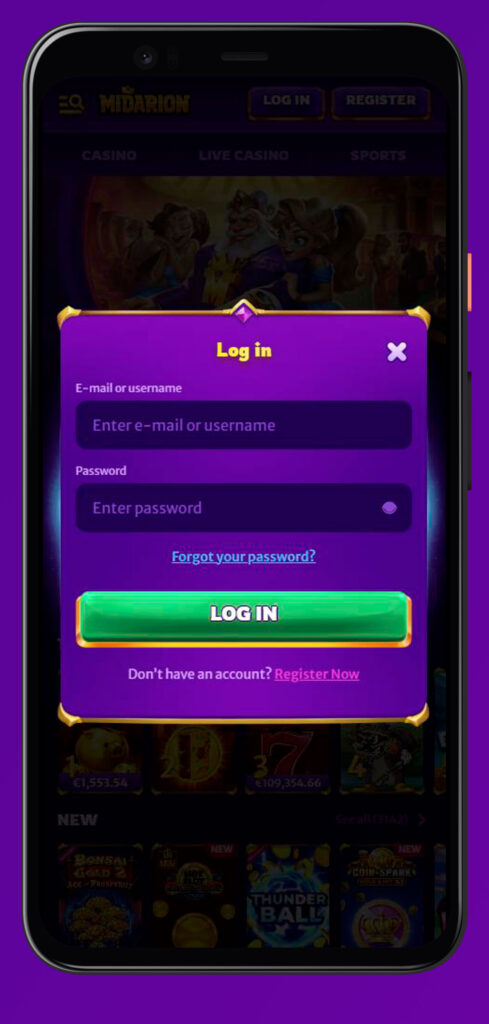
Once your account is created, logging in to Midarion is as simple as dropping in your email and password. You’ll find the “Log in” button clearly visible in the Midarion site header, right next to “Register”, on both desktop and mobile layouts.
If you ever run into issues, there is a whole Help Centre section dedicated to login problems, forgotten credentials and troubleshooting steps. Plus, you can always reach out to 24/7 support through live chat or email for a quick fix.
Desktop Login: Quick Access via Browser
On a desktop, you access Midarion through your regular browser using the main site address. In the top Midarion Casino menu, there’s a “Log in” button that opens a compact window with two fields, where you type your registered email and your password and click to enter.
A few handy desktop tips:
- Use the “Remember me” option in your browser if you’re on a private PC to speed up future Midarion Casino logins.
- Always make sure the URL is correct and secured with HTTPS before entering your details.
- If the page does not load properly, clear the cache or try another browser.
- For any persistent problem, the Help Centre and live chat are a click away from the footer.
So once you’ve logged in to Midarion Casino on desktop, you can freely jump between Casino, Live Casino, Jackpots and Sports using the left sidebar menu without having to sign in again.
Mobile Login and PWA Shortcut Access
On mobile, the Midarion Casino login flow uses the same email and password combo, but the buttons are optimised for smaller screens. The header collapses into a compact bar where you tap “Log in”, the form appears, and you sign in just like on a desktop.
Midarion even offers a “Create Shortcut” guide, showing you how to add a PWA-style icon to your Android or iOS home screen so the casino feels like a native app. You simply follow the browser’s “Add to Home Screen” or “Install app” prompt from the shortcut page, then you can tap the icon any time to go straight to our lobby and log in.
Forgot Your Password? Account Recovery Options
If your mind goes blank on your password, no worries, we’ve got a built-in recovery flow. On the login screen, there is a “Forgot your password?” link that opens a page where you enter your registered email and receive reset instructions.
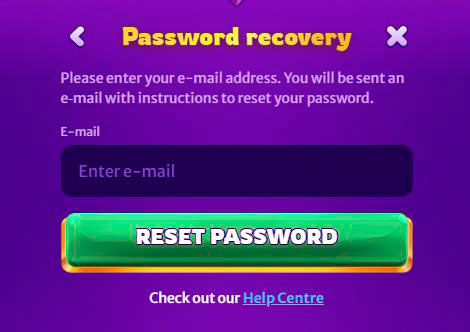
The Help Centre also points out that if you forgot the email or username you used to register at Midarion, you should contact support so they can help you recover access after confirming your identity. That way, we keep your account safe from random people guessing or fishing for your details.
Account Rules, Security and Responsible Gaming
Honestly, we love giving you big bonuses and loads of games, but we care just as much about keeping your account secure and your play healthy. That is why Midarion’s Terms and Responsible Gaming pages are pretty detailed and sometimes a bit strict, but they are there to protect you and us.
You’ll see clear rules about who can register at Midarion, how many accounts are allowed, how we handle suspicious activity, and what tools you have if you ever feel your gambling is getting out of hand. All of this is visible directly on the site through the Rules and Responsible Gaming links in the footer.
One Account Policy and Age Requirement (18+)
By the rules, you must be at least 18 years old and legally allowed to gamble online in your country to open an account at Midarion. If you are under 18 or from a restricted jurisdiction listed in our Excluded Jurisdictions section, you are not allowed to register at Midarion or play for real money.
Each player can only have one account with us, and that includes one per person, household, address, phone, email and IP. Any additional profiles are treated as duplicate accounts and may be closed with their winnings voided if they were used to bypass limits, bonus rules or other restrictions.
Self-Exclusion and Responsible Gaming Tools
Another standout is that we provide a full Responsible Gaming page where we explain the risks of gambling and encourage you to treat it as entertainment, not a way to make money. On that page and in the Terms, we highlight that you should not play under the influence of alcohol or drugs and that you should only gamble with money you can afford to lose.
If you ever feel things are going in the wrong direction, you can contact support and request to close or self-exclude your account, and we will help you block access and stop new accounts from being opened. The site footer also displays an “18+ Play responsibly” reminder and links to more information about safe play.
Conclusion
Bottom line, at Midarion Casino, you go through a simple three-step sign-up process, pick your favourite welcome bonus, make a fast euro deposit, then verify your details when requested so everything stays secure and compliant. Once your account is set, logging in on desktop or mobile is straightforward, and if you ever need a break or support, our responsible gaming tools and help team are always there for you 24/7.

Frequently Asked Questions
If you have your basic details ready, you can complete all three Midarion Casino sign-up steps in just a couple of minutes, from choosing a welcome offer to creating your account.
No, our Terms clearly state that only one account per person, household, email, phone number and IP is allowed, and duplicate accounts can be closed with winnings voided.
We may request KYC documents when you try to withdraw, after large deposits, or any time our security checks flag unusual activity, and you have 30 days to provide everything we ask.
You normally need a photo ID to prove your identity and age, proof of address like a utility bill, and documents that show you own the payment methods you use on the site.
On the login screen, click the “Forgot your password?” link, enter your registered email and follow the reset instructions we send you, or contact support if you do not remember your email.
Instead of a classic app store download, we provide a PWA-style shortcut you can add to your Android or iOS home screen using the “Create Shortcut” guide, then log in through that icon.
You can email or chat with our support team and ask to close or self-exclude your account, and we will assist you in blocking access as described in the Responsible Gaming and Terms pages.